Creating a Unified CMA Template Aligned with Nexus Web Platform
Project information
- Category: Print design
- Client: Valocity Global
Background
Nexus recently entered the real estate sector, already making waves with its innovative technology solutions and commitment to empowering professionals. Bridging traditional practices with cutting-edge digital advancements, Nexus offers agents and clients unparalleled tools for streamlined processes and enhanced efficiency. By forging collaborative partnerships and continuously evolving its offerings, Nexus aims to lead industry transformation, dedicated to empowering stakeholders to succeed in a competitive market.
Identifying Challenges
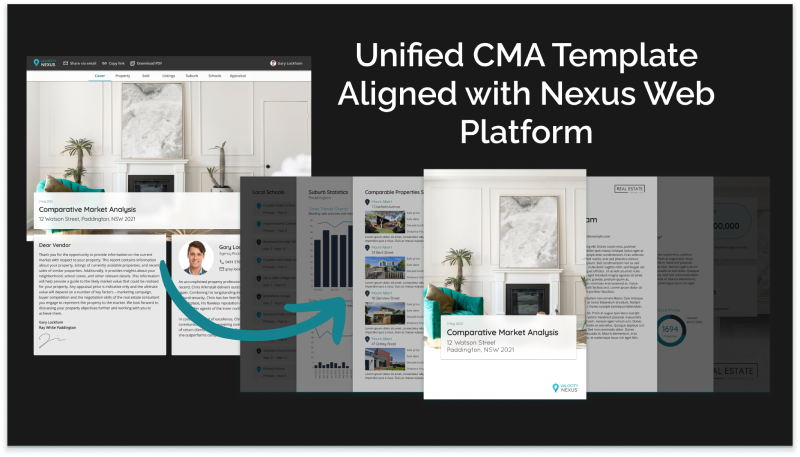
Nexus recognized the need to streamline the CMA process, aiming to enhance user experience for real estate agents and their clients. They sought to integrate a digital solution into the Nexus Web Platform that would automate the generation of CMA reports in PDF format. The challenge lay in creating a seamless experience that matched the platform's existing interface and functionality while maintaining brand consistency.
Approach
- User-Centric Design Reviewed extensive user research to understand the preferences and pain points of real estate agents and clients regarding CMAs. Identified key design elements and functionalities to enhance usability and effectiveness.
- Platform Analysis Analysed the design language and interface components of the Nexus Web Platform to ensure alignment with the CMA template. Identified opportunities for integration and customisation to create a cohesive user experience.
- Iterative Prototyping Developed wireframes and prototypes of the CMA template, iterating based on feedback from industry leading agents. Prioritised usability and readability in the design process, refining layout and styling to optimise the user experience.
- Branding Integration Incorporated Nexus's branding elements, including logo placement, colour scheme, and typography, to reinforce brand identity within the CMA template. Ensured that the template remained consistent with other Nexus communications to enhance brand recognition.
- Development and Integration Collaborated with developers to implement the CMA template within the Nexus Web Platform. Ensured seamless integration with existing features and workflows, conducting thorough testing to identify and address any compatibility issues.
- Feedback and Iteration Solicited feedback from agents following the rollout of the CMA template. Implemented iterative improvements based on user suggestions and usage data analysis, continuously refining the template to meet evolving needs.
Results
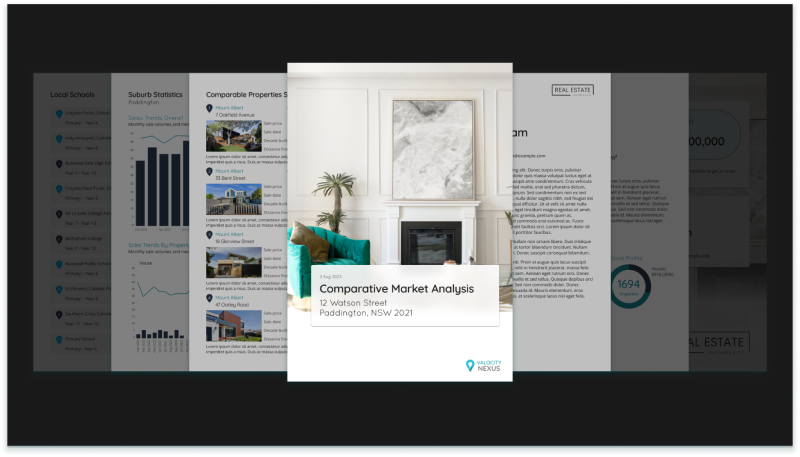
- Visual Consistency The CMA template achieved visual consistency with the Nexus Web Platform, reinforcing brand identity and enhancing overall user experience.
- Improved Usability Agents and clients benefited from a user-friendly template that facilitated efficient data entry and presentation, streamlining the CMA creation process.
- Seamless Integration The CMA template seamlessly integrated with the Nexus Web Platform, providing agents with easy access to essential tools and resources.
- Positive Feedback Initial feedback from users indicated high satisfaction with the CMA template, citing its usability, functionality, and alignment with Nexus's branding.
Conclusion
By creating a unified CMA template aligned with the Nexus Web Platform, Nexus has successfully enhanced the user experience for agents and clients while reinforcing brand identity across all touchpoints.The collaborative approach to design and development ensured that the template met the diverse needs of users while seamlessly integrating with existing platform features. Moving forward, Nexus remains committed to iterating on the CMA template to continually improve usability and functionality in response to user feedback and evolving industry trends.
My Learnings
Reflecting on my experience with the project to create a unified CMA template aligned with the Nexus Web Platform, I've recognized valuable insights for future endeavours. One key learning is the importance of optimising workflow efficiency, particularly in the final design stage. If I were to redo this project, I would opt to create the final designs directly in InDesign, rather than Figma. This decision would have saved valuable time for the team, as they wouldn't need to recreate the template in InDesign to incorporate form fields. By streamlining the design process and eliminating unnecessary steps, we could have allocated more time and resources to other critical aspects of the project, ultimately enhancing productivity and accelerating project delivery. This experience highlights the significance of leveraging tools and workflows that maximise efficiency and minimise unnecessary complexities in project execution.